Zoho Assist - Remote Desktop4.0.3
Publisher Description



Zoho Assist is a reliable remote desktop app that allows you to easily and securely connect to remote PCs from any location at anytime. One of the best aspects of Assist is that it works seamlessly across all major platforms.
Technicians can use Zoho Assist to launch a remote support, screen sharing, or unattended access session to support customers and fix issues in real time.
Key Features
Siri shortcuts: Start sessions, search for and connect to distant machines, and more using voice commands.
iOS widgets: With the iOS widgets feature, you may save your favorite URS device and access it directly from the home screen.
App lock: App lock provides a biometric lock to secure unattended remote support device.
Dark Mode: Choose between dark and bright modes based on your preferences.
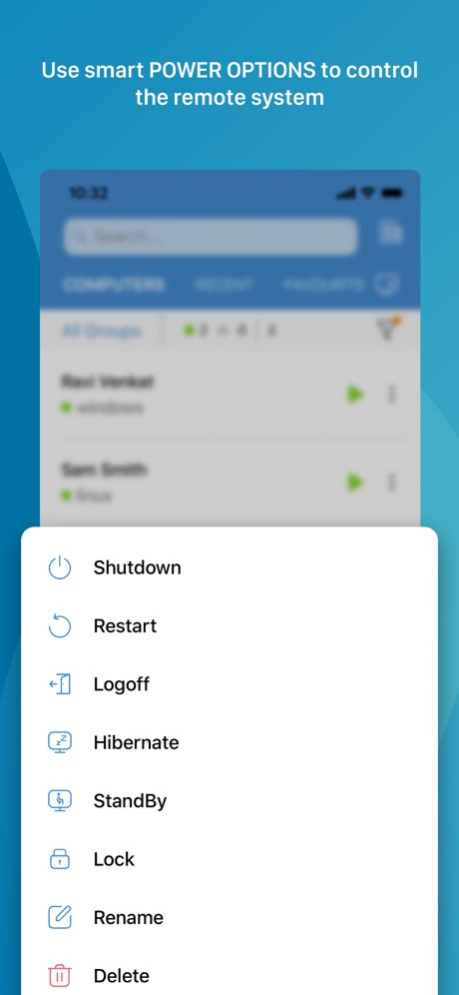
Power options at the remote end:
- Log off
- Reboot
- Shut down
Schedule a remote session with a specific time, date, and other details.
Use Assist's text chat option to communicate effectively with your customer during an active remote support session.
Multi-monitor navigation:
Technicians can access and control multiple monitors during a support session.
File transfer:
Send and receive files (up to 5 GB) from technician device to customer device during a remote session.
Session Notes: Take contextual session notes during a session without needing to switch between apps.
Screenshots sync:
Screenshots captured during a session may now be synced up to the cloud.
In-App purchases allow users to subscribe to Zoho Assist which enables these features for them:
-File Transfer
-Send Ctrl+Alt+Del
-Reboot and Reconnect
-Schedule Sessions
-Session Notes
Quick guide:
Install Zoho Assist Technician app.
Install the Zoho Assist customer app on the device you need to connect to.
Initiate a remote support session on your device and then prompt the customer to join the session using the customer app.
Privacy Policy and Terms & Conditions:
-https://www.zoho.com/privacy.html
-https://www.zoho.com/terms.html
Version History This update brings a more stable Picture-in-Picture mode, seamless keyboard shortcut support for Linux users, and additional enhancements for a smoother, uninterrupted experience. 4.0.3 Sep 10 With this update, the Zoho Assist app brings more reliable file transfers, for a smoother remote support experience. 4.0.2 Jul 17 With this update, you can now elevate to Admin Mode from the mobile app during a remote session making it easier to perform admin actions. Also, you can adjust the screen resolution of remote computers, enabling smoother and more efficient remote support. 4.0.1 Jun 16 With this update, Zoho Assist is now fully compatible with iOS 26, delivering a smooth and optimized experience on the latest Apple operating system. The interface has been refined for a visually improved experience and settings have been streamlined to manage your preferences with ease. 4.0.0 May 13 With this update, notifications are now extended to alert technicians instantly when customers join sessions and when service queues are assigned, ensuring faster response times. Additionally, notifications now cover scheduled sessions, including timely reminders and overdue alerts. This version also brings significantly improved video quality for a smoother and more immersive streaming experience, backed by updated codec support. 3.9 Apr 21 With this update, Zoho Assist supports peer to peer connectivity for remote sessions, enabling faster and more stable connections in varying network conditions. 3.8 Apr 10 With this update, input from non-English keyboards now works seamlessly when typing on the remote screen during sessions. Improved the login experience to ensure a smooth and uninterrupted flow for the users. 3.7.7 Mar 31 With this update, we’ve improved app stability and made general enhancements for a smoother experience. 3.7.5 Mar 3 With this update, experience enhanced precision with seamless external mouse scrolling for smoother navigation during remote sessions.
You can now instantly locate Unattended devices by searching their IP address improving the device accessibility. 3.7.4 Feb 23 With this update, global accessibility has been enhanced through new in-app language support, allowing you to select your preferred app language independently of your system settings.The reboot status is now displayed while the remote device is restarting.
Zoho Assist has expanded its language support to include Arabic, Hebrew, Kashmiri, Urdu, and Persian, with the interface automatically adapting to deliver a seamless and consistent experience for users worldwide. 3.7.3 Jan 8 Bug fixes and performance improvements. 3.7.2 11/17/2025 Bug fixes and performance enhancements 3.7.1 10/22/2025 Bug fixes and performance improvements 3.7 09/03/2025 Bug fixes and performance improvements. 3.6.2 08/21/2025 Bug fixes and performance enhancements. 3.6.1 07/30/2025 With this update, Picture-in-Picture (PiP) support is now available on iOS, allowing you to minimize the session screen and multitask without losing connection. This update also includes minor enhancements aimed at improving overall app stability and user experience. 3.6 07/03/2025 This update enhances your mobile experience with in-app session recording controls and brings overall improvements in stability and performance. 3.5.2 06/19/2025 This update offers improved performance with memory enhancements and quicker access to your recent and favorite items in the URS list. 3.5.1 05/20/2025 This update simplifies the process of inviting secondary technicians, ensuring a more efficient and seamless experience. You can now also invite external technicians to join the session for better collaboration. 3.5 04/15/2025 This update enhances video streaming performance and expands compatibility to Mac and VM environments, ensuring smoother remote sessions with improved stability. 3.4 04/04/2025 Bug fixes 3.3.1 02/23/2025 Video Streaming improvements enable real time screenshare for seamless troubleshooting. Plus, we’ve made minor enhancements and squashed some bugs for a smoother experience. 3.3 02/06/2025 Bug fixes and performance enhancements 3.2.25 01/20/2025 We’ve introduced URS device sorting for efficient organization and improved app performance to ensure a smoother, faster experience. 3.2.24 12/24/2024 Bug fixes and performance enhancements. 3.2.23 11/28/2024
About Zoho Assist - Remote Desktop
The company that develops Zoho Assist - Remote Desktop is Zoho Corporation. The latest version released by its developer is 4.0.3.
To install Zoho Assist - Remote Desktop on your iOS device, just click the green Continue To App button above to start the installation process. The app is listed on our website since 2026-10-15 and was downloaded 137 times. We have already checked if the download link is safe, however for your own protection we recommend that you scan the downloaded app with your antivirus. Your antivirus may detect the Zoho Assist - Remote Desktop as malware if the download link is broken.
How to install Zoho Assist - Remote Desktop on your iOS device:
- Click on the Continue To App button on our website. This will redirect you to the App Store.
- Once the Zoho Assist - Remote Desktop is shown in the iTunes listing of your iOS device, you can start its download and installation. Tap on the GET button to the right of the app to start downloading it.
- If you are not logged-in the iOS appstore app, you'll be prompted for your your Apple ID and/or password.
- After Zoho Assist - Remote Desktop is downloaded, you'll see an INSTALL button to the right. Tap on it to start the actual installation of the iOS app.
- Once installation is finished you can tap on the OPEN button to start it. Its icon will also be added to your device home screen.
Program Details
System requirements
Download information
Pricing
Version History
version 4.0.3
posted on 2026-10-15
Version History This update brings a more stable Picture-in-Picture mode, seamless keyboard shortcut support for Linux users, and additional enhancements for a smoother, uninterrupted experience. 4.0.3 Sep 10 With this update, the Zoho Assist app brings more reliable file transfers, for a smoother remote support experience. 4.0.2 Jul 17 With this update, you can now elevate to Admin Mode from the mobile app during a remote session making it easier to perform admin actions. Also, you can adjust the screen resolution of remote computers, enabling smoother and more efficient remote support. 4.0.1 Jun 16 With this update, Zoho Assist is now fully compatible with iOS 26, delivering a smooth and optimized experience on the latest Apple operating system. The interface has been refined for a visually improved experience and settings have been streamlined to manage your preferences with ease. 4.0.0 May 13 With this update, notifications are now extended to alert technicians instantly when customers join sessions and when service queues are assigned, ensuring faster response times. Additionally, notifications now cover scheduled sessions, including timely reminders and overdue alerts. This version also brings significantly improved video quality for a smoother and more immersive streaming experience, backed by updated codec support. 3.9 Apr 21 With this update, Zoho Assist supports peer to peer connectivity for remote sessions, enabling faster and more stable connections in varying network conditions. 3.8 Apr 10 With this update, input from non-English keyboards now works seamlessly when typing on the remote screen during sessions. Improved the login experience to ensure a smooth and uninterrupted flow for the users. 3.7.7 Mar 31 With this update, we’ve improved app stability and made general enhancements for a smoother experience. 3.7.5 Mar 3 With this update, experience enhanced precision with seamless external mouse scrolling for smoother navigation during remote sessions.
You can now instantly locate Unattended devices by searching their IP address improving the device accessibility. 3.7.4 Feb 23 With this update, global accessibility has been enhanced through new in-app language support, allowing you to select your preferred app language independently of your system settings.The reboot status is now displayed while the remote device is restarting.
Zoho Assist has expanded its language support to include Arabic, Hebrew, Kashmiri, Urdu, and Persian, with the interface automatically adapting to deliver a seamless and consistent experience for users worldwide. 3.7.3 Jan 8 Bug fixes and performance improvements. 3.7.2 11/17/2025 Bug fixes and performance enhancements 3.7.1 10/22/2025 Bug fixes and performance improvements 3.7 09/03/2025 Bug fixes and performance improvements. 3.6.2 08/21/2025 Bug fixes and performance enhancements. 3.6.1 07/30/2025 With this update, Picture-in-Picture (PiP) support is now available on iOS, allowing you to minimize the session screen and multitask without losing connection. This update also includes minor enhancements aimed at improving overall app stability and user experience. 3.6 07/03/2025 This update enhances your mobile experience with in-app session recording controls and brings overall improvements in stability and performance. 3.5.2 06/19/2025 This update offers improved performance with memory enhancements and quicker access to your recent and favorite items in the URS list. 3.5.1 05/20/2025 This update simplifies the process of inviting secondary technicians, ensuring a more efficient and seamless experience. You can now also invite external technicians to join the session for better collaboration. 3.5 04/15/2025 This update enhances video streaming performance and expands compatibility to Mac and VM environments, ensuring smoother remote sessions with improved stability. 3.4 04/04/2025 Bug fixes 3.3.1 02/23/2025 Video Streaming improvements enable real time screenshare for seamless troubleshooting. Plus, we’ve made minor enhancements and squashed some bugs for a smoother experience. 3.3 02/06/2025 Bug fixes and performance enhancements 3.2.25 01/20/2025 We’ve introduced URS device sorting for efficient organization and improved app performance to ensure a smoother, faster experience. 3.2.24 12/24/2024 Bug fixes and performance enhancements. 3.2.23 11/28/2024
version 4.0.3
posted on 2026-09-10
Version History This update brings a more stable Picture-in-Picture mode, seamless keyboard shortcut support for Linux users, and additional enhancements for a smoother, uninterrupted experience. 4.0.3 6h ago With this update, the Zoho Assist app brings more reliable file transfers, for a smoother remote support experience. 4.0.2 Jul 17 With this update, you can now elevate to Admin Mode from the mobile app during a remote session making it easier to perform admin actions. Also, you can adjust the screen resolution of remote computers, enabling smoother and more efficient remote support. 4.0.1 Jun 16 With this update, Zoho Assist is now fully compatible with iOS 26, delivering a smooth and optimized experience on the latest Apple operating system. The interface has been refined for a visually improved experience and settings have been streamlined to manage your preferences with ease. 4.0.0 May 13 With this update, notifications are now extended to alert technicians instantly when customers join sessions and when service queues are assigned, ensuring faster response times. Additionally, notifications now cover scheduled sessions, including timely reminders and overdue alerts. This version also brings significantly improved video quality for a smoother and more immersive streaming experience, backed by updated codec support. 3.9 Apr 21 With this update, Zoho Assist supports peer to peer connectivity for remote sessions, enabling faster and more stable connections in varying network conditions. 3.8 Apr 10 With this update, input from non-English keyboards now works seamlessly when typing on the remote screen during sessions. Improved the login experience to ensure a smooth and uninterrupted flow for the users. 3.7.7 Mar 31 With this update, we’ve improved app stability and made general enhancements for a smoother experience. 3.7.5 Mar 3 With this update, experience enhanced precision with seamless external mouse scrolling for smoother navigation during remote sessions.
You can now instantly locate Unattended devices by searching their IP address improving the device accessibility. 3.7.4 Feb 23 With this update, global accessibility has been enhanced through new in-app language support, allowing you to select your preferred app language independently of your system settings.The reboot status is now displayed while the remote device is restarting.
Zoho Assist has expanded its language support to include Arabic, Hebrew, Kashmiri, Urdu, and Persian, with the interface automatically adapting to deliver a seamless and consistent experience for users worldwide. 3.7.3 Jan 8 Bug fixes and performance improvements. 3.7.2 11/17/2025 Bug fixes and performance enhancements 3.7.1 10/22/2025 Bug fixes and performance improvements 3.7 09/03/2025 Bug fixes and performance improvements. 3.6.2 08/21/2025 Bug fixes and performance enhancements. 3.6.1 07/30/2025 With this update, Picture-in-Picture (PiP) support is now available on iOS, allowing you to minimize the session screen and multitask without losing connection. This update also includes minor enhancements aimed at improving overall app stability and user experience. 3.6 07/03/2025 This update enhances your mobile experience with in-app session recording controls and brings overall improvements in stability and performance. 3.5.2 06/19/2025 This update offers improved performance with memory enhancements and quicker access to your recent and favorite items in the URS list. 3.5.1 05/20/2025 This update simplifies the process of inviting secondary technicians, ensuring a more efficient and seamless experience. You can now also invite external technicians to join the session for better collaboration. 3.5 04/15/2025 This update enhances video streaming performance and expands compatibility to Mac and VM environments, ensuring smoother remote sessions with improved stability. 3.4 04/04/2025 Bug fixes 3.3.1 02/23/2025 Video Streaming improvements enable real time screenshare for seamless troubleshooting. Plus, we’ve made minor enhancements and squashed some bugs for a smoother experience. 3.3 02/06/2025 Bug fixes and performance enhancements 3.2.25 01/20/2025 We’ve introduced URS device sorting for efficient organization and improved app performance to ensure a smoother, faster experience. 3.2.24 12/24/2024 Bug fixes and performance enhancements. 3.2.23 11/28/2024
version 4.0.2
posted on 2026-09-03
Version History With this update, the Zoho Assist app brings more reliable file transfers, for a smoother remote support experience. 4.0.2 Jul 17 With this update, you can now elevate to Admin Mode from the mobile app during a remote session making it easier to perform admin actions. Also, you can adjust the screen resolution of remote computers, enabling smoother and more efficient remote support. 4.0.1 Jun 16 With this update, Zoho Assist is now fully compatible with iOS 26, delivering a smooth and optimized experience on the latest Apple operating system. The interface has been refined for a visually improved experience and settings have been streamlined to manage your preferences with ease. 4.0.0 May 13 With this update, notifications are now extended to alert technicians instantly when customers join sessions and when service queues are assigned, ensuring faster response times. Additionally, notifications now cover scheduled sessions, including timely reminders and overdue alerts. This version also brings significantly improved video quality for a smoother and more immersive streaming experience, backed by updated codec support. 3.9 Apr 21 With this update, Zoho Assist supports peer to peer connectivity for remote sessions, enabling faster and more stable connections in varying network conditions. 3.8 Apr 10 With this update, input from non-English keyboards now works seamlessly when typing on the remote screen during sessions. Improved the login experience to ensure a smooth and uninterrupted flow for the users. 3.7.7 Mar 31 With this update, we’ve improved app stability and made general enhancements for a smoother experience. 3.7.5 Mar 3 With this update, experience enhanced precision with seamless external mouse scrolling for smoother navigation during remote sessions.
You can now instantly locate Unattended devices by searching their IP address improving the device accessibility. 3.7.4 Feb 23 With this update, global accessibility has been enhanced through new in-app language support, allowing you to select your preferred app language independently of your system settings.The reboot status is now displayed while the remote device is restarting.
Zoho Assist has expanded its language support to include Arabic, Hebrew, Kashmiri, Urdu, and Persian, with the interface automatically adapting to deliver a seamless and consistent experience for users worldwide. 3.7.3 Jan 8 Bug fixes and performance improvements. 3.7.2 11/17/2025 Bug fixes and performance enhancements 3.7.1 10/22/2025 Bug fixes and performance improvements 3.7 09/03/2025 Bug fixes and performance improvements. 3.6.2 08/21/2025 Bug fixes and performance enhancements. 3.6.1 07/30/2025 With this update, Picture-in-Picture (PiP) support is now available on iOS, allowing you to minimize the session screen and multitask without losing connection. This update also includes minor enhancements aimed at improving overall app stability and user experience. 3.6 07/03/2025 This update enhances your mobile experience with in-app session recording controls and brings overall improvements in stability and performance. 3.5.2 06/19/2025 This update offers improved performance with memory enhancements and quicker access to your recent and favorite items in the URS list. 3.5.1 05/20/2025 This update simplifies the process of inviting secondary technicians, ensuring a more efficient and seamless experience. You can now also invite external technicians to join the session for better collaboration. 3.5 04/15/2025 This update enhances video streaming performance and expands compatibility to Mac and VM environments, ensuring smoother remote sessions with improved stability. 3.4 04/04/2025 Bug fixes 3.3.1 02/23/2025 Video Streaming improvements enable real time screenshare for seamless troubleshooting. Plus, we’ve made minor enhancements and squashed some bugs for a smoother experience. 3.3 02/06/2025 Bug fixes and performance enhancements 3.2.25 01/20/2025 We’ve introduced URS device sorting for efficient organization and improved app performance to ensure a smoother, faster experience. 3.2.24 12/24/2024 Bug fixes and performance enhancements. 3.2.23 11/28/2024 Experience smoother, more intuitive navigation with our revamped gesture methods, making it easier than ever to interact with remote devices. We’ve also enhanced the unattended device details listing and made general fixes to improve overall performance. 3.2.22 11/04/2024
version 4.0.1
posted on 2026-07-06
Version History With this update, you can now elevate to Admin Mode from the mobile app during a remote session making it easier to perform admin actions. Also, you can adjust the screen resolution of remote computers, enabling smoother and more efficient remote support. 4.0.1 Jun 16 With this update, Zoho Assist is now fully compatible with iOS 26, delivering a smooth and optimized experience on the latest Apple operating system. The interface has been refined for a visually improved experience and settings have been streamlined to manage your preferences with ease. 4.0.0 May 13 With this update, notifications are now extended to alert technicians instantly when customers join sessions and when service queues are assigned, ensuring faster response times. Additionally, notifications now cover scheduled sessions, including timely reminders and overdue alerts. This version also brings significantly improved video quality for a smoother and more immersive streaming experience, backed by updated codec support. 3.9 Apr 21 With this update, Zoho Assist supports peer to peer connectivity for remote sessions, enabling faster and more stable connections in varying network conditions. 3.8 Apr 10 With this update, input from non-English keyboards now works seamlessly when typing on the remote screen during sessions. Improved the login experience to ensure a smooth and uninterrupted flow for the users. 3.7.7 Mar 31 With this update, we’ve improved app stability and made general enhancements for a smoother experience. 3.7.5 Mar 3 With this update, experience enhanced precision with seamless external mouse scrolling for smoother navigation during remote sessions.
You can now instantly locate Unattended devices by searching their IP address improving the device accessibility. 3.7.4 Feb 23 With this update, global accessibility has been enhanced through new in-app language support, allowing you to select your preferred app language independently of your system settings.The reboot status is now displayed while the remote device is restarting.
Zoho Assist has expanded its language support to include Arabic, Hebrew, Kashmiri, Urdu, and Persian, with the interface automatically adapting to deliver a seamless and consistent experience for users worldwide. 3.7.3 Jan 8 Bug fixes and performance improvements. 3.7.2 11/17/2025 Bug fixes and performance enhancements 3.7.1 10/22/2025 Bug fixes and performance improvements 3.7 09/03/2025 Bug fixes and performance improvements. 3.6.2 08/21/2025 Bug fixes and performance enhancements. 3.6.1 07/30/2025 With this update, Picture-in-Picture (PiP) support is now available on iOS, allowing you to minimize the session screen and multitask without losing connection. This update also includes minor enhancements aimed at improving overall app stability and user experience. 3.6 07/03/2025 This update enhances your mobile experience with in-app session recording controls and brings overall improvements in stability and performance. 3.5.2 06/19/2025 This update offers improved performance with memory enhancements and quicker access to your recent and favorite items in the URS list. 3.5.1 05/20/2025 This update simplifies the process of inviting secondary technicians, ensuring a more efficient and seamless experience. You can now also invite external technicians to join the session for better collaboration. 3.5 04/15/2025 This update enhances video streaming performance and expands compatibility to Mac and VM environments, ensuring smoother remote sessions with improved stability. 3.4 04/04/2025 Bug fixes 3.3.1 02/23/2025 Video Streaming improvements enable real time screenshare for seamless troubleshooting. Plus, we’ve made minor enhancements and squashed some bugs for a smoother experience. 3.3 02/06/2025 Bug fixes and performance enhancements 3.2.25 01/20/2025 We’ve introduced URS device sorting for efficient organization and improved app performance to ensure a smoother, faster experience. 3.2.24 12/24/2024 Bug fixes and performance enhancements. 3.2.23 11/28/2024 Experience smoother, more intuitive navigation with our revamped gesture methods, making it easier than ever to interact with remote devices. We’ve also enhanced the unattended device details listing and made general fixes to improve overall performance. 3.2.22 11/04/2024 Bug fixes and performance enhancements 3.2.21 08/29/2024
version 4.0.0
posted on 2026-06-02
Version History With this update, Zoho Assist is now fully compatible with iOS 26, delivering a smooth and optimized experience on the latest Apple operating system. The interface has been refined for a visually improved experience and settings have been streamlined to manage your preferences with ease. 4.0.0 May 13 With this update, notifications are now extended to alert technicians instantly when customers join sessions and when service queues are assigned, ensuring faster response times. Additionally, notifications now cover scheduled sessions, including timely reminders and overdue alerts. This version also brings significantly improved video quality for a smoother and more immersive streaming experience, backed by updated codec support. 3.9 Apr 21 With this update, Zoho Assist supports peer to peer connectivity for remote sessions, enabling faster and more stable connections in varying network conditions. 3.8 Apr 10 With this update, input from non-English keyboards now works seamlessly when typing on the remote screen during sessions. Improved the login experience to ensure a smooth and uninterrupted flow for the users. 3.7.7 Mar 31 With this update, we’ve improved app stability and made general enhancements for a smoother experience. 3.7.5 Mar 3 With this update, experience enhanced precision with seamless external mouse scrolling for smoother navigation during remote sessions.
You can now instantly locate Unattended devices by searching their IP address improving the device accessibility. 3.7.4 Feb 23 With this update, global accessibility has been enhanced through new in-app language support, allowing you to select your preferred app language independently of your system settings.The reboot status is now displayed while the remote device is restarting.
Zoho Assist has expanded its language support to include Arabic, Hebrew, Kashmiri, Urdu, and Persian, with the interface automatically adapting to deliver a seamless and consistent experience for users worldwide. 3.7.3 Jan 8 Bug fixes and performance improvements. 3.7.2 11/17/2025 Bug fixes and performance enhancements 3.7.1 10/22/2025 Bug fixes and performance improvements 3.7 09/03/2025 Bug fixes and performance improvements. 3.6.2 08/21/2025 Bug fixes and performance enhancements. 3.6.1 07/30/2025 With this update, Picture-in-Picture (PiP) support is now available on iOS, allowing you to minimize the session screen and multitask without losing connection. This update also includes minor enhancements aimed at improving overall app stability and user experience. 3.6 07/03/2025 This update enhances your mobile experience with in-app session recording controls and brings overall improvements in stability and performance. 3.5.2 06/19/2025 This update offers improved performance with memory enhancements and quicker access to your recent and favorite items in the URS list. 3.5.1 05/20/2025 This update simplifies the process of inviting secondary technicians, ensuring a more efficient and seamless experience. You can now also invite external technicians to join the session for better collaboration. 3.5 04/15/2025 This update enhances video streaming performance and expands compatibility to Mac and VM environments, ensuring smoother remote sessions with improved stability. 3.4 04/04/2025 Bug fixes 3.3.1 02/23/2025 Video Streaming improvements enable real time screenshare for seamless troubleshooting. Plus, we’ve made minor enhancements and squashed some bugs for a smoother experience. 3.3 02/06/2025 Bug fixes and performance enhancements 3.2.25 01/20/2025 We’ve introduced URS device sorting for efficient organization and improved app performance to ensure a smoother, faster experience. 3.2.24 12/24/2024 Bug fixes and performance enhancements. 3.2.23 11/28/2024 Experience smoother, more intuitive navigation with our revamped gesture methods, making it easier than ever to interact with remote devices. We’ve also enhanced the unattended device details listing and made general fixes to improve overall performance. 3.2.22 11/04/2024 Bug fixes and performance enhancements 3.2.21 08/29/2024 Enjoy faster load times, seamless data synchronization, and a smoother overall experience with performance improvements to our APIs. 3.2.20 08/12/2024
version 3.7.5
posted on 2026-03-03
With this update, we’ve improved app stability and made general enhancements for a smoother experience.
version 3.7.4
posted on 2026-02-23
With this update, experience enhanced precision with seamless external mouse scrolling for smoother navigation during remote sessions.
You can now instantly locate Unattended devices by searching their IP address improving the device accessibility.
version 3.7.3
posted on 2026-01-08
With this update, global accessibility has been enhanced through new in-app language support, allowing you to select your preferred app language independently of your system settings.The reboot status is now displayed while the remote device is restarting.
Zoho Assist has expanded its language support to include Arabic, Hebrew, Kashmiri, Urdu, and Persian, with the interface automatically adapting to deliver a seamless and consistent experience for users worldwide.
version 3.7
posted on 2025-09-03
Sep 3, 2025
Version 3.7
Bug fixes and performance improvements
version 3.6
posted on 2025-07-03
Jul 3, 2025
Version 3.6
With this update, Picture-in-Picture (PiP) support is now available on iOS, allowing you to minimize the session screen and multitask without losing connection. This update also includes minor enhancements aimed at improving overall app stability and user experience.
